
With Pipes, I think Yahoo! has a really interesting and powerful solution. Yesterday, I did a quick demo to my colleagues during an internal Lightning Talks session showing how they could tune their blog feeds in order to integrate better in our corporate planet blog (still under development).
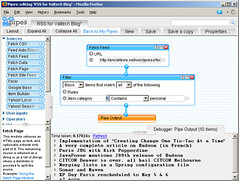
For this, the programming is really simple. In the case of my own blog, I only needed to filter out posts marked with the ‘personal’ category. The pipe looks like this (I’m not providing a link to the original pipe, because there is a good chance it will get changed by the time you access it):
Simple, or what?
Notice the list of available components on the left-hand side, with documentation on the lower-left panel. Also, the ‘debug’ panel on the bottom of the page shows the output of a particular element. Really convenient.
I have also used Yahoo! Pipes to aggregate several blogs coming from my colleagues, the end plan being that to show them on a common page. Aggregating several blogs is more challenging, because you do not control all aspects of a feed. So you need to do slightly more advanced processing.
In the case of our blog, I had to:
- add an author element to some feeds that didn’t have one
- remove duplicate posts
- truncate descriptions, as some were taking way too much space on the final page
- some feeds had elements containing similar values (author, typically), but with different name, so I copy them to the appropriate element
- do various minor clean-ups
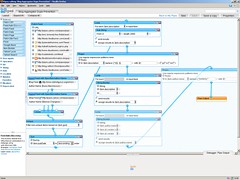
Obviously, the resulting pipe is more complex. Still readable, though:
All in all, I am very impressed with the technology. I’m not going to say that anyone can use it, even non-programmers, but it is certainly open to many more users than standard programming languages.
Microsoft seems to have a competing technology with Popfly. One difference, though, is that it requires the installation of the Silverlight runtime (and a Passport login — I used to have one, but lost it years ago), which makes it a bit more clunky to work with. Yahoo! Pipes only requires a Javascript-enabled browser. A casual look at the Popfly homepage suggests that most usages of the technology are mostly made by people already using MS products (many implementations for the Zune, for example). However, Google Trends suggests that Yahoo! Pipes and MS Popfly actually have a similar mindshare.
Another service that is competing with Yahoo! Pipes is Feedburner. More more limited, though. For example, if the ‘author’ element is not provided, you have the option to provide a value. But it must be hard-coded (impossible to get it from another element in the feed, for example). Feedburner has a feature called Feedburner Networks that would have been of use for us, but it seems to be in beta, and only those who join the beta program last year that play with it.
In fact, Feedburner is not even trying to compete seriously with Yahoo! Pipes. Their big thing is marketing: they provide a good number of tools to compute statistics and traffic information. This is rather nice. My main concern is that they have been acquired by Google a year ago, and it seems that few new features have been created since then. I’m sure they are working on integrating with Google Analytics, but where’s the meat?
That said, I am at least using it to clean-up a feed that Yahoo! Pipes failed to read. So everyone can play nicely together, you see! ;-)
Anyway, go and check out Yahoo! Pipes. Really impressive stuff.


Hi,
I was just wondering how you provided the ‘author’ element?
I’ve been trying to create one using the renamer. It appears in the debugger, but gets filtered out when running the pipe.
I’m also having the same problem with the ‘source’ element.
Thanks,
Steve York
But… isn’t it what the 2nd screenshot shows? wait, I forgot the link to the bigger image. Whoops. Fixed it, now.
So, as you can see (now), my plan has been to copy various possible places where the author value could be, into item.author.name.
I later realize that this was not enough for many aggregated feeds, so I had to add quite a few custom author values. You have an example of that on the middle-left. I have a separate pipe for setting the author tag, which you should find easily (it is very simple: just populates the feed’s item.author.name field for each post).
Thanks, Eric. This was really helpful in remapping one RSS item to another. For example, my feed reader was showing the item.description as the full content, even though it was essentially just an excerpt. So I remapped item.description to item.content:encoded.content, which contained the full content, and that worked perfectly. Good work.
Hi! How do i add the custom pipe that adds the autor values?
@Nybakk I had to add to create the custom pipe myself. It’s really not difficult, but you can copy mine if you want: http://pipes.yahoo.com/pipes/pipe.info?_id=RP6bYawW3RGoa0tezKky6g
There might a better way of doing that.
Hi,
I am a new on yahoo pipes and would be happy to know how I can customize my RSS feed. I would like to delete some content on my RSS feed. Can someone help me?